

Krisp review
Real-time noise cancellation for live calls across any app, not a fix for files you've already recorded
Independent review. If you buy through links on this page we may earn a commission, at no extra cost to you. It never changes our scores — how we test.
ToolsGavel verdict
Krisp's noise cancellation works across any calling app, not just the handful it names, because it sits at the OS audio level instead of inside one app's plugin system. That earns the $8 to $16 a month per user if background noise on calls is a real problem for you. What it won't do is clean a file you've already recorded, and what it used to do for free, it no longer does: the free-forever plan is gone, replaced by a 7-day trial. Trustpilot's 3.0 out of 5 reflects real billing and auto-renewal complaints, not a flaw in the core noise-cancellation feature G2 reviewers rate at 4.7.
Audited price: $8/mo billed annually , $16/mo month-to-month (advertised: $8/mo per user (Core, billed annually)) — verified 2026-10-26.
Best for: Remote workers and sales or support teams on frequent Zoom, Teams or Meet calls who want noise cancellation that follows them across apps, and who are fine paying per seat once the 7-day trial ends
What we liked
- Noise cancellation runs at the operating-system audio level as a virtual mic and speaker, so it works inside virtually any calling app (Zoom, Teams, Meet, Slack Huddles, Discord, Webex, WeChat, Loom) instead of being locked into one app the way Zoom's and Teams' own free built-in suppression are (krisp.ai)
- Cancellation is bidirectional, cleaning your own mic and stripping background noise out of what other call participants are sending too, plus echo and cross-talk (krisp.ai)
- Real-time noise processing happens on the device itself; Krisp's privacy policy states voice data never leaves the machine during noise cancellation and that the company doesn't store or access that audio (Krisp privacy policy)
- A 7-day trial unlocks every feature, including noise cancellation, transcription and AI notes, with no credit card required (krisp.ai/pricing/)
- G2 rates it 4.7 out of 5 across roughly 1,600 reviews, and the real-time noise cancellation itself is the most consistently praised feature across G2, Trustpilot and Product Hunt (G2)
What to watch
- Trustpilot scores it just 3.0 out of 5 from 412 reviews, a steep drop from G2's 4.7 out of 5; the gap concentrates in a 15% one-star cluster tied to billing and auto-renewal disputes, not the core noise cancellation feature (Trustpilot)
- Reviewers describe the desktop app as resource-heavy: one Trustpilot reviewer measured 1.4 GB of memory use just sitting on standby, and G2 reviewers report lag and fan spin-up on older or already-loaded machines (Trustpilot / G2)
- Krisp retired its free-forever plan in 2026 (it used to cap noise cancellation at 60 minutes a day); the only no-cost option today is a 7-day trial, and several 2026 review sites document real user frustration over the change (freehush.com, usekrisp.com, thebusinessdive.com)
- Several Trustpilot reviewers report Krisp turned on auto-renewal without clear notice and declined refunds afterward, and one flagged the app creating an unsolicited calendar reminder to install the desktop client, calling it bad practice (Trustpilot)
How much does Krisp really cost?
| Advertised price | $8/mo per user (Core, billed annually) |
|---|---|
| Real monthly cost, billed annually | $8/mo |
| Real monthly cost, month-to-month | $16/mo |
| Month-to-month premium | +100% over the annual-billing rate |
| The billing catch | Billed monthly doubles to $16/mo per user, and Krisp retired its free-forever plan in 2026; only a 7-day trial remains before noise cancellation requires payment. |
| Permanent free tier | No |
| Price last verified | 2026-10-26, against the live pricing page at krisp.ai |
Model seats and billing cycles for Krisp in the true-cost calculator, or see every audited price in the Pricing Gap Index.
Price watch
Get an email if Krisp's price changes
We re-check Krisp's pricing on a schedule. If the price, the free plan or a verified deal changes, you get one short email. Nothing else.
Krisp is a noise-cancellation app that strips background sound out of a live call before it reaches the other end, bundled with an AI meeting assistant in the same account. Core pricing runs $16 a month per user billed monthly, or $8 a month per user billed annually, after a 7-day trial that needs no credit card. Krisp used to give away a free-forever tier; that plan is gone as of 2026, which matters if you landed here searching for a free noise-cancelling app. Trustpilot rates it 3.0 out of 5 from 412 reviews, G2 rates it 4.7 out of 5 from roughly 1,600. Both numbers are real, and the gap between them is worth understanding before you buy (covered below).
What Krisp does on a live call
Krisp installs as a virtual microphone and virtual speaker at the operating-system level, not as a plugin inside one app. That’s the structural difference from Zoom’s and Microsoft Teams’ own noise suppression, which ships free on every plan but only cleans audio inside that single app. Turn Krisp on once and it cleans your mic input and the incoming audio from other speakers on Zoom, Teams, Google Meet, Slack Huddles, Discord, Webex, WeChat and Loom, plus any other app that reads from your system’s audio input or output. It also cuts echo and cross-talk, the voices bleeding in from someone else’s background. All of that processing happens on the device itself: Krisp’s privacy policy states voice data never leaves the machine during noise cancellation, and the company doesn’t store or access that audio.
How much does Krisp cost?
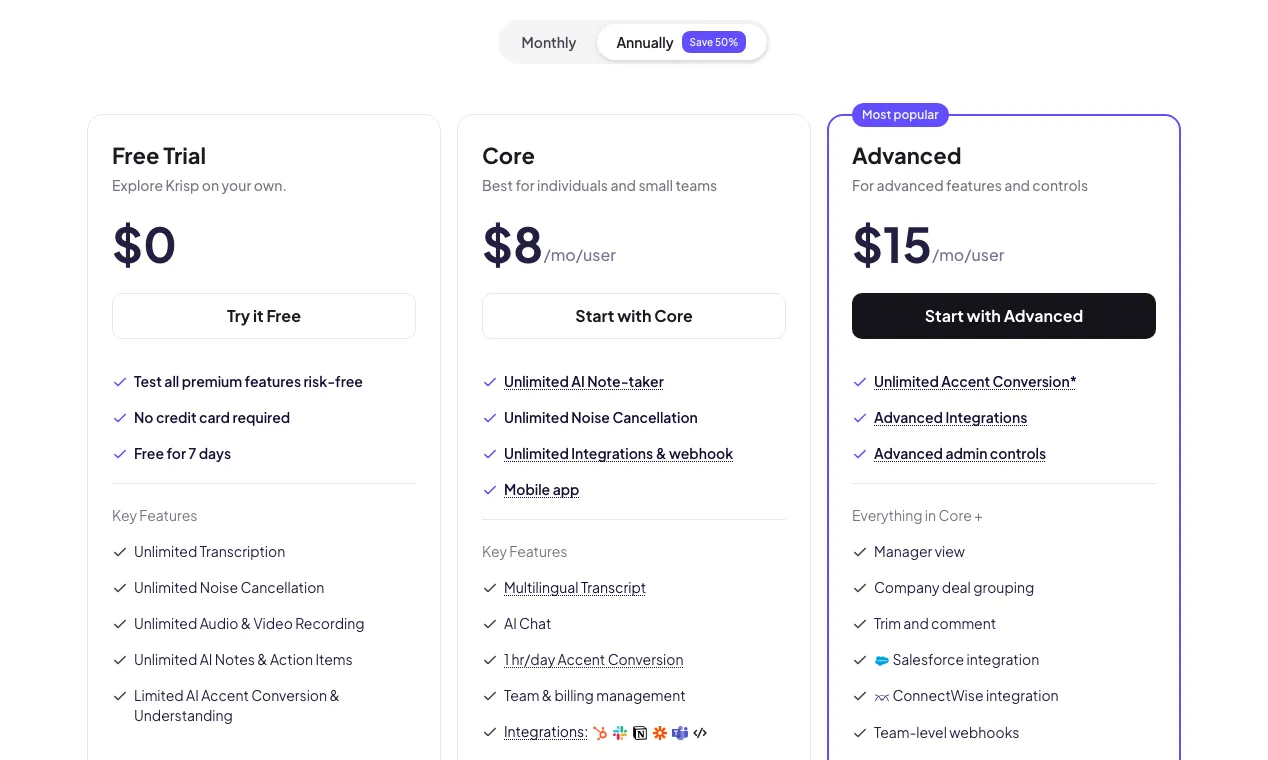
| Plan | Monthly (per user) | Annual (per user/mo) | Noise cancellation | Transcription & notes | Storage |
|---|---|---|---|---|---|
| 7-day trial | $0 | n/a | Unlimited (trial only) | Unlimited | n/a |
| Core | $16 | $8 | Unlimited | Unlimited | 10 GB |
| Advanced | $30 | $15 | Unlimited | Unlimited, plus manager view | 60 GB |
| Enterprise | Custom | Custom | Unlimited | Unlimited, plus on-device transcription | Unlimited |
The trial unlocks everything, including noise cancellation, recording and transcription, before you pick a plan. After seven days, keeping noise cancellation running requires a paid subscription; there’s no free-forever fallback anymore.
Does Krisp clean audio you’ve already recorded?
No, and Krisp says so itself. Its own blog tells readers that if a recording already exists, they’re cleaning it after the fact, and points them to a dedicated audio cleaner instead of to Krisp. A second Krisp blog post, written specifically to explain how to clean up recorded audio, skips Krisp entirely and recommends Adobe Audition, Final Cut Pro and Logic Pro, describing Krisp only as something you turn on during a live meeting. If you have a video or voice memo that’s already noisy, two tools built for that job: Adobe Podcast’s Enhance Speech is free for up to an hour a day (a 30-minute, 500 MB cap per file), with a $9.99/mo Premium tier that extends that to 4 hours a day and adds video support and speaker separation. Descript’s Studio Sound sits inside its editor: the free plan covers 60 minutes of media a month with limited Studio Sound, and paid plans start at $24/mo billed annually (Hobbyist) if you need more. Neither is a Krisp feature. Both are the right next step if your file is already recorded.
What about meeting notes and transcripts?
Beyond noise cancellation, Krisp records and transcribes meetings without a visible bot joining the call, since it works off your own device session, and turns the transcript into automated notes and action items. Core includes unlimited transcription and AI notes plus 10 GB of storage and unlimited integrations and webhooks; Advanced adds a manager view, deal grouping, trim and comment tools, Salesforce and ConnectWise integrations, and 60 GB of storage. You can also upload an existing recording for transcription, but that’s a notes feature, not a noise-cleaning one; it transcribes the file as-is rather than quieting it. One spec worth flagging before you rely on Krisp for a non-English team: no page we checked confirms exactly how many languages meeting transcription supports, so confirm directly with Krisp if that matters for your use case.
Is Krisp’s noise cancellation private?
Krisp draws a real line between its two main functions on privacy. Noise cancellation is local on every plan; your mic audio never reaches Krisp’s servers. Transcription and AI notes work differently: that audio is processed in Krisp’s cloud by default, and private on-device transcription and recording is gated to Enterprise. Krisp’s homepage advertises SOC 2, GDPR, HIPAA and PCI-DSS compliance badges, but the HIPAA one needs a caveat the badge doesn’t give you: a signed Business Associate Agreement, the legal document that actually makes a vendor HIPAA-compliant for a healthcare practice, is available only at the Enterprise tier, and only once you’re buying 100 or more seats. A therapist or small clinic on Core or Advanced doesn’t get a BAA from Krisp, badge or no badge.
Why Trustpilot and G2 tell such different stories
A 3.0 out of 5 on Trustpilot next to a 4.7 on G2 looks like a data error until you read what each pool of reviewers is actually rating. Trustpilot’s 412 reviews skew toward people with a billing problem: 15% are one-star, clustered around auto-renewal. One reviewer wrote that Krisp turned on auto-renew without notifying them and then declined a refund; another described the app creating an unprompted calendar event reminding them to install the desktop client, calling it bad practice. A separate, recurring complaint on both platforms is resource use: one Trustpilot reviewer measured the app using 1.4 GB of memory just sitting on standby, and G2 reviewers report lag, choppy audio and fan spin-up on older or already-loaded machines, the real cost of running neural noise suppression in real time. G2’s 1,600-plus reviews lean toward people evaluating the feature set day to day, where the noise cancellation draws consistent praise, alongside gripes that accent conversion can distort natural tone and that the app sometimes disconnects and needs re-setup. Add the 2026 retirement of the free-forever plan, and you get three distinct sources of frustration showing up more heavily in one review pool than the other.
A few alternatives worth knowing about
If Krisp isn’t the right fit, here’s where the adjacent searches usually land. NVIDIA Broadcast is free and does real-time mic and webcam noise removal, but it needs a compatible RTX GPU and runs on Windows only, with no file-cleaning mode either. Zoom’s and Microsoft Teams’ own built-in suppression are free on any plan and genuinely effective, but each works inside that app alone, not across your whole system the way Krisp does. Otter.ai competes on the meeting-transcription side (free plan covers 300 minutes a month with a 30-minute cap per conversation, Pro runs $8.33/mo billed annually) but has no real-time noise-cancellation feature of its own. Granola is a similar meeting-notes competitor, free on its Basic plan with notes hidden after 30 days, $14 per user a month on Business, and like Otter, it doesn’t touch your mic audio.
Who should buy it, and who should skip it
Krisp fits remote workers and anyone on frequent video calls from a home office, co-working space or anywhere with unpredictable background noise, who wants cancellation that follows them across every app instead of being locked into Zoom or Teams. It also fits sales and support teams that want transcripts and action items generated automatically from calls already happening on Zoom, Teams or Meet. Skip it if you’re trying to clean a file that’s already recorded; go to Adobe Podcast’s Enhance Speech or Descript’s Studio Sound instead. Skip it too if you need a real HIPAA BAA below 100 seats, or if you came looking for the old free-forever plan; that plan is gone, and the only no-cost option today is a 7-day trial.
What do users say about Krisp?
Our summary of public reviews on G2 and Trustpilot, checked November 8, 2026. These are user opinions, not our test results.
 G2
 Trustpilot
What users praise
- Noise cancellation, the core feature: 224 G2 reviews tag it as a strength, and it is what most positive Trustpilot reviews describe, from home offices to cafés.
- Ease of use and setup (Ease of Use 269, Easy Setup 142 on G2).
- Reliability and meeting transcripts (Reliability 154, Transcription 166 on G2).
What users complain about
- Transcription accuracy is the most-tagged weakness on G2 (Inaccurate Transcription 57, Poor Transcription Accuracy 51, AI Inaccuracy 47).
- Audio problems such as glitches and choppy sound (Audio Issues 60, Noise Issues 44 on G2).
- Recent 1–2 star Trustpilot reviews (July–September 2026) say the app is hard to uninstall and keeps relaunching, and gives too little control over which calls get recorded.
Trustpilot's 3.0 sits far below G2's 4.7 because complaints about billing, renewals and the desktop app collect there; the noise cancellation itself is rarely the problem.
Pricing note: Krisp sells per-seat Meeting AI plans, with no self-serve free tier. Core costs $16/mo per user billed monthly or $8/mo per user billed annually ($96/yr), and includes unlimited real-time noise cancellation, unlimited transcription and AI notes, 1 hour a day of accent conversion on both the speaker and listener side, 10 GB of storage, and unlimited integrations and webhooks. Advanced, Krisp's 'most popular' tier, runs $30/mo per user monthly or $15/mo per user annually ($180/yr), and adds a manager view, deal grouping, trim and comment tools, Salesforce and ConnectWise integrations, 4 hours a day of speaker-side accent conversion (unlimited on the listener side), and 60 GB of storage. Enterprise is custom-priced and adds SSO/SCIM, SOC 2 reporting, a signed HIPAA Business Associate Agreement (available only at 100+ seats), private on-device transcription and recording, unlimited storage, and a dedicated account manager. Every plan is unlocked first through a 7-day trial that needs no credit card; after that, noise cancellation requires a paid subscription. Krisp used to run a free-forever plan (60 minutes a day of noise cancellation, unlimited transcription, 2 AI notes a day) and retired it in 2026, a change multiple third-party review sites describe as a source of real user frustration. Krisp also sells a separate Call Center AI line (CC Core at $15 per agent/month billed annually) and a Developer/API tier, both outside the scope of this review. Verified against krisp.ai/pricing/ on 2026-10-26.
Frequently asked questions
How much does Krisp cost?
Krisp's Meeting AI plans run $16 a month per user billed monthly, or $8 a month per user if you pay annually, on the Core plan. Advanced, the 'most popular' tier, costs $30 a month per user billed monthly or $15 a month per user annually, and Enterprise is custom-priced. Every plan starts with a 7-day free trial that needs no credit card and unlocks every feature, including noise cancellation and transcription, before you choose a plan.
Is there a free version of Krisp?
Not anymore. Krisp used to offer a free-forever plan capped at 60 minutes of noise cancellation a day, but it retired that tier in 2026. The only no-cost option today is the 7-day trial, after which noise cancellation requires a paid Core, Advanced or Enterprise subscription.
Can Krisp remove background noise from a recorded video?
No. Krisp's own blog content says so directly: its noise cancellation works on live audio only, and if a recording already exists, you're cleaning it after the fact. For a file you've already recorded, Krisp's blog points readers to tools built for that job, such as Adobe Podcast's Enhance Speech (free up to 1 hour a day, $9.99/mo Premium) or Descript's Studio Sound (free plan available, paid plans from $24/mo billed annually).
Does Krisp work with Zoom and Microsoft Teams?
Yes, along with Google Meet, Slack Huddles, Discord, Webex, WeChat and Loom. Krisp runs at the operating-system audio level as a virtual mic and speaker, so it works inside any app that reads from your system's audio input or output, not just the apps listed by name on its homepage.
Is Krisp's noise cancellation private?
Real-time noise cancellation is processed on-device on every plan; per Krisp's privacy policy, voice data never leaves the machine during that process. Meeting transcription and AI notes work differently: that audio is sent to Krisp's cloud by default, and fully private on-device transcription is an Enterprise-only feature. A signed HIPAA Business Associate Agreement is also Enterprise-only, and only at 100 or more seats, so Core and Advanced buyers shouldn't rely on the homepage's blanket HIPAA-compliant badge on its own.
Bottom line
Krisp's noise cancellation works across any calling app, not just the handful it names, because it sits at the OS audio level instead of inside one app's plugin system. That earns the $8 to $16 a month per user if background noise on calls is a real problem for you. What it won't do is clean a file you've already recorded, and what it used to do for free, it no longer does: the free-forever plan is gone, replaced by a 7-day trial. Trustpilot's 3.0 out of 5 reflects real billing and auto-renewal complaints, not a flaw in the core noise-cancellation feature G2 reviewers rate at 4.7.
Alternatives in AI Meeting Note Takers

AI meeting notes without a bot in your calls

Bot or bot-free meeting notes at a low seat price, backed by a review base too thin to call a track record

Bot-free meeting notes built for sales teams, priced well above general-purpose notetakers