

folk review
Relationship CRM built around LinkedIn contact enrichment, with automation gated behind a pricier tier
Independent review. If you buy through links on this page we may earn a commission, at no extra cost to you. It never changes our scores — how we test.
ToolsGavel verdict
folk's LinkedIn Chrome extension and one-click Gmail/Outlook sync make contact enrichment genuinely faster than a general CRM, and reviewers say so consistently. The catch is automation: anything beyond a trigger-based email requires Premium at $60/mo ($48 annually), there's no free plan, and there's still no mobile app as of this check.
Audited price: $24/mo billed annually , $30/mo month-to-month (advertised: $24/user/mo (Standard, billed annually)) — verified 2026-10-30.
Best for: Agencies and solo operators who want LinkedIn-driven contact enrichment in their CRM and don't mind paying double for automation beyond simple trigger emails
Deal 10% off for new customers Applied automatically when you sign up through our link. No code needed.
What we liked
- The LinkedIn Chrome extension pulling contact details straight into the pipeline is folk's most-cited differentiator across G2 and Capterra reviews (G2/Capterra)
- New-to-CRM reviewers describe setup as quick and easy (Capterra)
- Support draws repeated praise for being fast and proactive about migration help (Trustpilot)
- The Kanban interface draws a positive contrast against heavier CRMs across multiple reviews (G2)
- AI-assisted follow-up and deal-recap features ship even on the entry Standard tier (folk.app/pricing)
What to watch
- Workflow automation sits entirely behind Premium at $60/mo, or $48 billed annually, doubling the per-seat price for anything beyond trigger emails (folk.app/pricing)
- No iOS or Android app as of this review, a gap repeated across multiple 2026 reviews (G2/Capterra)
- No free-forever plan, just a 2-week trial with no card required (folk.app/pricing)
- The integration catalogue thins out fast past Gmail, Outlook and LinkedIn, the most common single criticism in review mining (G2/Capterra consensus)
How much does folk really cost?
| Advertised price | $24/user/mo (Standard, billed annually) |
|---|---|
| Real monthly cost, billed annually | $24/mo |
| Real monthly cost, month-to-month | $30/mo |
| Month-to-month premium | +25% over the annual-billing rate |
| The billing catch | Workflow automation beyond simple trigger emails requires Premium at double the price, $60/mo ($48 annually), and there's no free-forever plan. |
| Permanent free tier | No |
| Price last verified | 2026-10-30, against the live pricing page at folk.app |
Model seats and billing cycles for folk in the true-cost calculator, or see every audited price in the Pricing Gap Index.
Price watch
Get an email if folk's price changes
We re-check folk's pricing on a schedule. If the price, the free plan or a verified deal changes, you get one short email. Nothing else.
folk is a relationship-focused CRM built around a Chrome extension that pulls contact details straight off LinkedIn into a Kanban-style pipeline, aimed at agencies, recruiters and solo operators who manage relationships more than a formal sales process. Pricing runs $30 a month per seat for the entry Standard tier, or $24 billed annually, with a second Premium tier at double that price for anything beyond basic trigger-based automation. There’s no free plan, just a 2-week trial with no card required. Review sites rate it 4.0 to 4.5 out of 5 depending on platform as of this check, with G2 and Capterra both more favorable than Trustpilot’s small 22-review sample.
What folk is for
folk’s signature feature is its LinkedIn Chrome extension: it pulls a contact’s name, company, title and profile details into the pipeline with one click, a workflow reviewers across G2 and Capterra cite as the main reason they picked it over a general-purpose CRM. The Standard tier backs that up with one-click Gmail, Outlook, calendar and WhatsApp sync, unlimited custom fields and tags, and AI-assisted follow-up and deal-recap suggestions. What it doesn’t have at that price is workflow automation beyond simple trigger-based emails, or any native deal-value forecasting or win-rate reporting at any tier.
Pricing and plans
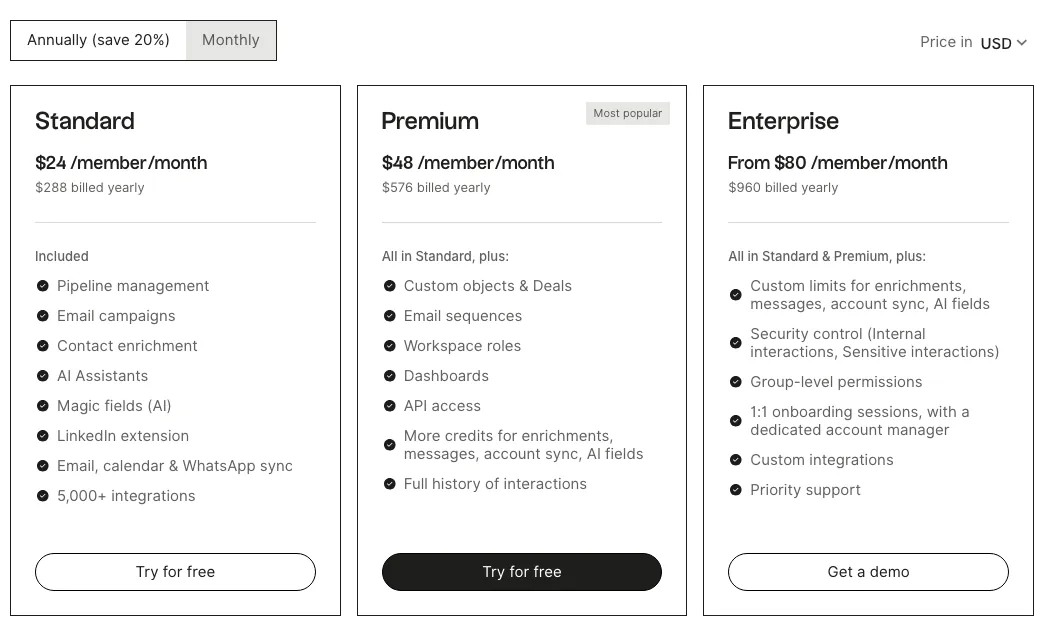
| Plan | Monthly/seat | Annual/seat | Annual total | What you get |
|---|---|---|---|---|
| Standard | $30 | $24 | $288/yr | Pipeline, LinkedIn enrichment, email/calendar/WhatsApp sync, trigger emails only |
| Premium | $60 | $48 | $576/yr | Adds real sequences, custom objects/deals, roles, dashboards, API |
| Enterprise | from $100 | from $80 | n/a | Custom limits, SSO, dedicated account manager |
There’s no seat minimum on any tier, and billing runs per workspace member, prorated as you add or remove people.
Where it shines
The enrichment workflow is genuinely different from a general CRM: click the extension on a LinkedIn profile, and the contact lands in folk’s pipeline with details already filled in, a setup reviewers describe as fast even for someone new to CRM software. Support draws repeated praise for being proactive about migration help in Trustpilot reviews, and the Kanban interface reads as lighter and faster than heavier general-purpose CRMs across multiple G2 reviews. AI-assisted follow-up suggestions and deal recaps ship even on the $30 Standard tier, not held back for Premium.
Where it frays
Automation is where folk asks for a second payment. Anything beyond a simple trigger-based email requires Premium, $60 a month or $48 billed annually, effectively doubling the per-seat price to get real sequences. There’s no iOS or Android app as of this review, a gap repeated across multiple 2026 reviews on both G2 and Capterra, and no free-forever plan, just the 2-week trial. The integration catalogue is the other recurring complaint: past the headline Gmail, Outlook and LinkedIn set, reviewers describe it as noticeably thinner than general-purpose CRM competitors.
Who should buy it
Buy folk if your pipeline runs on relationships built through LinkedIn and you’re fine paying $60 a seat once you need real automation. If a formal multi-pipeline sales process matters more than enrichment, Nutshell and Capsule both cost less at the entry tier and include a free trial or free plan to test first. If calling is the core workflow instead, see the tradeoff between a calling-first CRM and a lighter one in Close vs EngageBay. The full shortlist, with a badge for each use case, is in Best CRM for Small Business.
Pricing note: folk prices per workspace seat, prorated when you add or remove members. Standard is $30/mo per seat, or $24/mo billed annually ($288/yr), and includes the Kanban pipeline, unlimited custom fields and tags, one-click Gmail/Outlook, calendar and WhatsApp sync, the LinkedIn Chrome extension for contact enrichment, and AI-assisted follow-ups, but workflow automation is limited to trigger-based emails only. Premium is $60/mo per seat, or $48/mo billed annually ($576/yr), and adds real email sequences, custom objects and deals, workspace roles, dashboards and API access. Enterprise starts from $100/mo ($80 billed annually) with custom limits, security and a dedicated account manager, quoted individually above that floor. There's no seat minimum and no free-forever plan, just a 2-week free trial with full Premium features and no credit card required.
folk promo code and discounts
Signing up through our link applies 10% off for new customers automatically — no code to enter. Verified November 3, 2026 .
We only list codes and deals issued to ToolsGavel or published by folk itself. If a coupon site shows a bigger folk discount, check that folk confirms it before you count on it. How we verify codes.
Frequently asked questions
How much does folk cost?
folk has two priced tiers plus a custom Enterprise plan. Standard runs $30/mo per seat, or $24/mo billed annually ($288/yr). Premium runs $60/mo per seat, or $48/mo billed annually ($576/yr), and is where real email sequences and automation live. Enterprise starts from $100/mo ($80 billed annually), quoted individually above that floor.
Does folk have a free plan?
No. folk offers a 2-week free trial with full Premium features and no credit card required, but there's no free-forever tier. Capsule and EngageBay, two other CRMs in this category, both have one.
Does folk include workflow automation?
Only in a limited form on Standard: trigger-based emails. Real email sequences and broader workflow automation require Premium, which costs double the Standard seat price at $60/mo, or $48/mo billed annually.
Is there a folk mobile app?
No. As of this review, folk has no iOS or Android app, a gap multiple 2026 reviews on G2 and Capterra mention specifically.
How does folk compare to Nutshell or Capsule?
folk's strength is LinkedIn-driven contact enrichment, a feature neither Nutshell nor Capsule has. Both of those cost less at the entry tier, $19 (Nutshell, or $13 billed annually) and $21 (Capsule) a seat month to month against folk's $30, and both offer a free trial or free plan to test before paying anything.
Bottom line
folk's LinkedIn Chrome extension and one-click Gmail/Outlook sync make contact enrichment genuinely faster than a general CRM, and reviewers say so consistently. The catch is automation: anything beyond a trigger-based email requires Premium at $60/mo ($48 annually), there's no free plan, and there's still no mobile app as of this check.
Alternatives in CRM Software

Per-seat sales CRM with one of the lowest paid entry prices in this category and no contract to sign

CRM with a genuinely usable free plan and a 14-day grace period if you decide to leave

The CRM built for high-velocity sales teams