

Murf AI review
Business voiceover studio with a slide-sync editor, metered by rendered minutes instead of characters
Independent review. If you buy through links on this page we may earn a commission, at no extra cost to you. It never changes our scores — how we test.
ToolsGavel verdict
Murf AI's slide-synced editor and PowerPoint, Canva and Articulate 360 integrations make it the strongest fit here for corporate training and eLearning voiceovers, backed by a 4.7/5 G2 score across 1,413 reviews. The tradeoffs are real: Voice Generation Time spends on every render including a take you throw away, cloning stays locked out until the $66/mo Business tier, and a documented refund-dispute cluster makes up 12% of its Trustpilot reviews.
Audited price: $19/mo billed annually , $29/mo month-to-month (advertised: $19/mo (Creator, billed annually)) — verified 2026-10-30.
Best for: Corporate training and eLearning teams building slide-synced voiceovers who can live with voice cloning locked to the $66/mo Business tier
What we liked
- A full production editor, not a plain text box: a slide and video timeline sync plus PowerPoint, Canva and Articulate 360 integrations make it a genuine corporate-training tool (geekflare.com, layer3labs.io)
- G2's own sentiment breakdown of its 1,413 reviews cites ease of use in 169 reviews, natural-sounding output in 125, and voice-customization controls in 117 (G2)
- Commercial rights unlock at the cheapest paid tier, Creator at $19/mo billed annually, with no separate upgrade needed just to publish finished audio (murf.ai/text-to-speech)
- Voice actors are real, consenting professionals paid on a royalty agreement, and Murf says it doesn't train its models on enterprise customer data, a meaningful point for brand-safety-sensitive buyers (vendor claim, cross-confirmed across independent review summaries)
- Support quality scores 9.3 out of 10 among G2 reviewers, and Murf says it has been a G2 Momentum Leader for three straight years (G2; Murf)
What to watch
- Voice Generation Time spends on every render, not just the exports a buyer keeps: independent analysis estimates heavy editors burn two to three times their finished runtime, and a daily poster on Creator hits the yearly ceiling by the third quarter (dailyaifixs.com breakdown)
- Voice cloning sits behind Business ($66/mo billed annually) and Enterprise, so a Creator-tier subscriber, the cheapest commercial-rights plan, can't clone a voice at all (murf.ai/text-to-speech)
- Minutes don't carry forward, and Murf keeps whatever's left unused when a customer cancels; 12% of its 186 Trustpilot reviews are one-star, citing refund denials and at least one unexplained $366.84 charge (Trustpilot)
- Studio and the Developer API sit on two different pricing pages with two different ladders, and the one most buyers want, Studio, doesn't live at the obvious /pricing URL, a real trap for anyone comparison-shopping (murf.ai)
How much does Murf AI really cost?
| Advertised price | $19/mo (Creator, billed annually) |
|---|---|
| Real monthly cost, billed annually | $19/mo |
| Real monthly cost, month-to-month | $29/mo |
| Month-to-month premium | +53% over the annual-billing rate |
| The billing catch | Billed monthly jumps to $29/mo (+53%), and every rendered take spends the Voice Generation Time allowance, including a take you regenerate and then discard. |
| Permanent free tier | Yes |
| Price last verified | 2026-10-30, against the live pricing page at murf.ai |
Model seats and billing cycles for Murf AI in the true-cost calculator, or see every audited price in the Pricing Gap Index.
Price watch
Get an email if Murf AI's price changes
We re-check Murf AI's pricing on a schedule. If the price, the free plan or a verified deal changes, you get one short email. Nothing else.
Murf AI is a browser-based voiceover studio built around a slide and video timeline editor, aimed at corporate training teams, course creators and marketers producing narrated video at volume rather than a single ad read. Murf Inc., founded in San Francisco in October 2020, says it has 6 million-plus users and 300-plus Forbes 2000 clients. Pricing starts at $0 for about 10 minutes of lifetime use and runs through $19/mo billed annually for the cheapest commercial-rights tier, up to custom Enterprise pricing with unlimited use and voice cloning. G2 rates it 4.7 out of 5 from 1,413 reviews as of October 2026, Murf’s strongest third-party score of the three checked for this review.
What Murf AI is for
The Studio editor opens like a slide deck: drop a script into each slide or scene, pick from 200-plus voices across 30 to 35-plus languages, and adjust pitch, pace and emphasis with SSML-level controls. The sync layer underneath is what sets it apart from a plain text-to-speech box. PowerPoint, Canva and Articulate 360 integrations let a training team build a narrated course directly on top of slides they already have, and 8,000-plus licensed, royalty-free soundtracks come bundled from Creator up. Script-to-video dubbing and translation round out the feature set.
Murf’s own pricing page is easy to misread if you don’t already know what it covers. murf.ai/pricing shows only the pay-as-you-go Developer API, a separate product with its own per-character rate card built for software teams wiring TTS into an app. The Studio plans this review covers, the ones an actual voiceover buyer wants, live at murf.ai/text-to-speech instead.
What you get on each plan
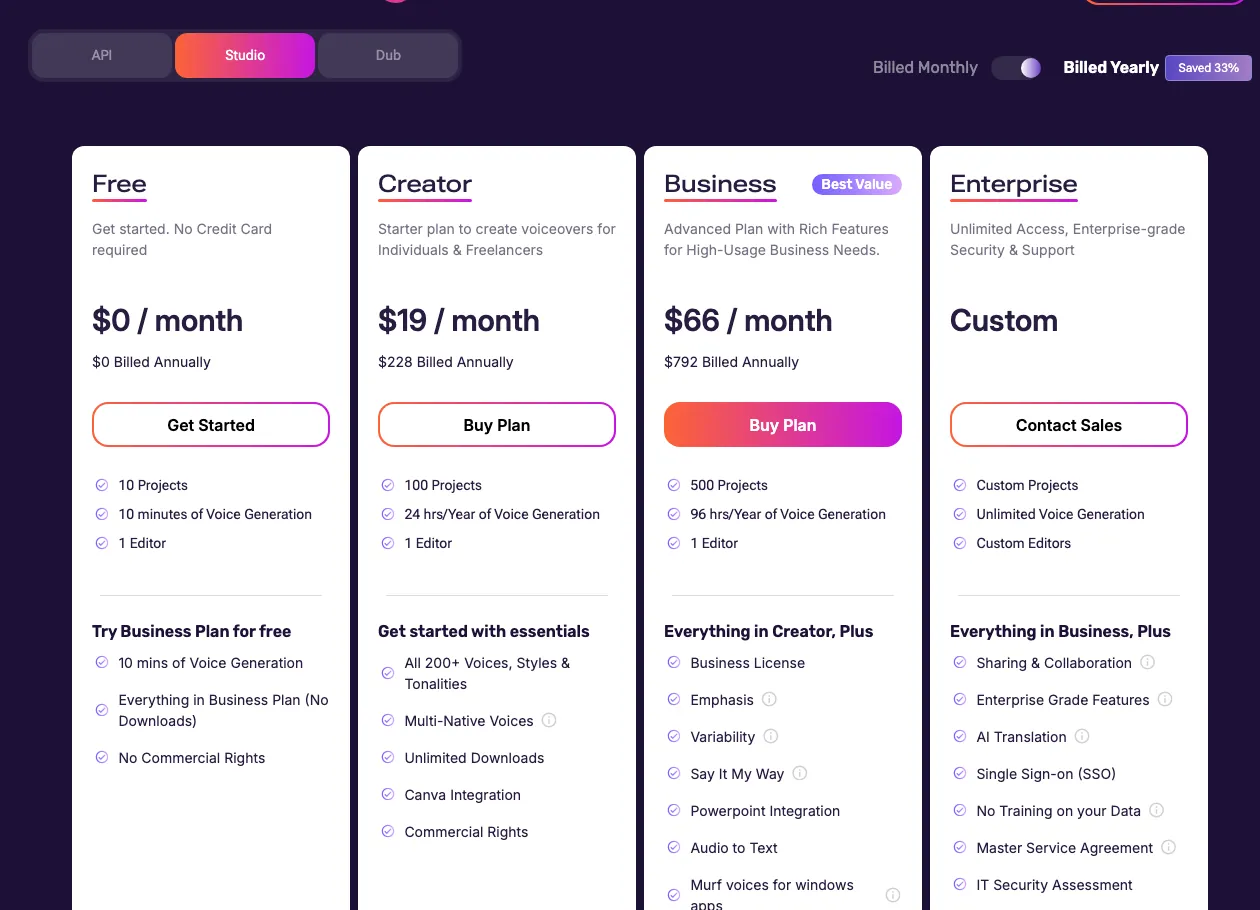
| Plan | Monthly | Annual (per mo) | Voice Generation Time | Commercial rights | Voice cloning |
|---|---|---|---|---|---|
| Free | $0 | — | ~10 min, total, not monthly | No | No |
| Creator | $29/mo | $19/mo ($228/yr) | ~24 hrs/yr (~2 hrs/mo) | Yes | No |
| Business | $99/mo | $66/mo ($792/yr) | ~96 hrs/yr | Yes, + team license | Yes |
| Enterprise | Custom | Custom | Unlimited | Yes | Yes |
Where the metering bites
Murf doesn’t bill by the word or the character. It bills by Voice Generation Time, the length of audio rendered and exported, and that number moves every time render gets pressed, whether the result gets kept or not. One independent pricing breakdown states it directly: regenerate a clip five times and all five attempts spend the allowance. The same breakdown estimates heavy editors burn two to three times their finished runtime once retakes are counted, and that a daily poster on the Creator plan hits the yearly ceiling by the third quarter. Nothing on Murf’s site or help center says what happens, or what it costs, once that ceiling hits mid-cycle, so treat Creator’s 2 hours a month as a soft cap, not a fixed budget line.
Voice cloning adds a second gate on top of the minutes problem. It isn’t available on Free or Creator at any price. A solo creator paying for the cheapest commercial-rights plan still can’t clone a voice without stepping up to Business at $66/mo billed annually or higher.
What users say in reviews
 G2 is where Murf looks strongest: 4.7 out of 5 from 1,413 reviews, a G2 Momentum Leader for three years running by Murf’s own account, and a 9.3 support-quality score.
 Trustpilot tells a narrower, rougher story from 186 reviews: 75% five-star, but 12% one-star, with almost nothing in between. That one-star cluster centers on billing, not voice quality. One reviewer described customer service as unwilling to help on a refund, “especially if they already took your money.” Another reported a $366.84 charge with no apparent reason, and paid minutes don’t carry over once a subscription is canceled, so a stockpiled balance gets forfeited rather than refunded.
 Capterra shows 4.5 out of 5, but from only 4 reviews, too small a sample to treat as a settled score either way. Read it as two populations telling two different stories: G2’s active users rating the product itself, and Trustpilot’s post-cancellation reviewers rating the billing experience.
Who should buy it, and who should skip it
Murf AI earns its place for corporate training, course creation and any team producing narrated video on a schedule tight enough that slide sync and template integrations save real editing time. It’s a weaker fit for anyone who specifically needs voice cloning on a budget, since that feature starts at Business, $66/mo billed annually, a jump the cheapest commercial tier doesn’t cover. ElevenLabs offers Instant Voice Cloning from its $5/mo Starter plan instead, at the cost of its own credit system spending on every failed take the same way Murf’s minutes do. WellSaid sidesteps that burn-on-failure problem, since only downloaded minutes count against its plan, but it has no self-serve cloning at any price. See the full breakdown in Best AI Voice Generators, including where Speechify Studio lands on cloning and price.
Pricing note: Murf sells two separate products on two separate pricing ladders: the Studio voiceover editor this review covers, and a pay-as-you-go Developer API with its own rate card for software teams. Studio's Free plan gives about 10 minutes of Voice Generation Time total, not monthly, across 200+ voices and 30+ languages, no card required, but no commercial rights and no voice cloning. Creator costs $29/mo month-to-month or $19/mo billed annually ($228/yr) for roughly 24 hours of Voice Generation Time a year (about 2 hours a month), full commercial rights, and the same 200+ voice library. Business costs $99/mo or $66/mo billed annually ($792/yr) for roughly 96 hours of Voice Generation Time a year, a team license, and voice cloning. Enterprise is custom-quoted for unlimited Voice Generation Time plus cloning. The metering unit is Voice Generation Time, the length of audio rendered and exported, not characters or words, and every render spends the allowance, including a take you regenerate and then discard. No pricing page or help article states what happens, or what it costs, once a plan's allowance runs out mid-cycle. Verified against murf.ai/text-to-speech, cross-checked against two independent third-party pricing breakdowns that agree on every figure here, on 2026-10-30.
Frequently asked questions
How much does Murf AI cost?
Murf's Studio editor runs four tiers. Free gives about 10 minutes of Voice Generation Time total (not monthly), no card required. Creator costs $29/mo month-to-month or $19/mo billed annually ($228/yr) for roughly 2 hours of Voice Generation Time a month and full commercial rights. Business costs $99/mo or $66/mo billed annually ($792/yr) for roughly 96 hours a year, a team license, and voice cloning. Enterprise is custom-quoted for unlimited use. A separate pay-as-you-go Developer API bills by the character on its own rate card and isn't part of this pricing.
Does Murf AI have a free plan?
Yes, but it's a one-time allowance, not a monthly refresh: about 10 minutes of Voice Generation Time total, across 200+ voices and 30+ languages, no credit card required. It carries no commercial license and no voice cloning, so anything made on it is for testing only.
Can I clone my own voice on Murf AI?
Not on Free or Creator. Voice cloning is gated to Business, $99/mo or $66/mo billed annually, and Enterprise. A solo creator on the cheapest commercial-rights plan, Creator, can't clone a voice at any price without upgrading.
Why does Murf AI's Voice Generation Time run out faster than expected?
Because it meters rendered audio, not finished audio. Every time a script gets generated, including a take that's immediately discarded and re-recorded, the Voice Generation Time allowance drops. One independent pricing breakdown estimates heavy editors burn two to three times their finished runtime once retakes are counted, and that a daily poster on Creator hits the yearly ceiling by the third quarter.
Is Murf AI's 4.7 G2 rating trustworthy?
G2's score comes from a real sample, 1,413 reviews, and holds up as the strongest of Murf's three third-party scores. Trustpilot's 4.5-4.6/5 from 186 reviews tells a rougher story underneath: 75% five-star, but 12% one-star, concentrated on billing and refund complaints. Capterra's 4.5/5 comes from only 4 reviews, too thin a sample to treat as settled either way.
Bottom line
Murf AI's slide-synced editor and PowerPoint, Canva and Articulate 360 integrations make it the strongest fit here for corporate training and eLearning voiceovers, backed by a 4.7/5 G2 score across 1,413 reviews. The tradeoffs are real: Voice Generation Time spends on every render including a take you throw away, cloning stays locked out until the $66/mo Business tier, and a documented refund-dispute cluster makes up 12% of its Trustpilot reviews.
Alternatives in AI Voice Generators

The most natural AI voice generator, priced by the character

Low-priced voice suite with cloning, dubbing and avatars, held back by support complaints and an unclear commercial-rights tier

Brand-safe voiceover tool that only meters downloads, with no self-serve voice cloning at any tier